The Compound Library Window
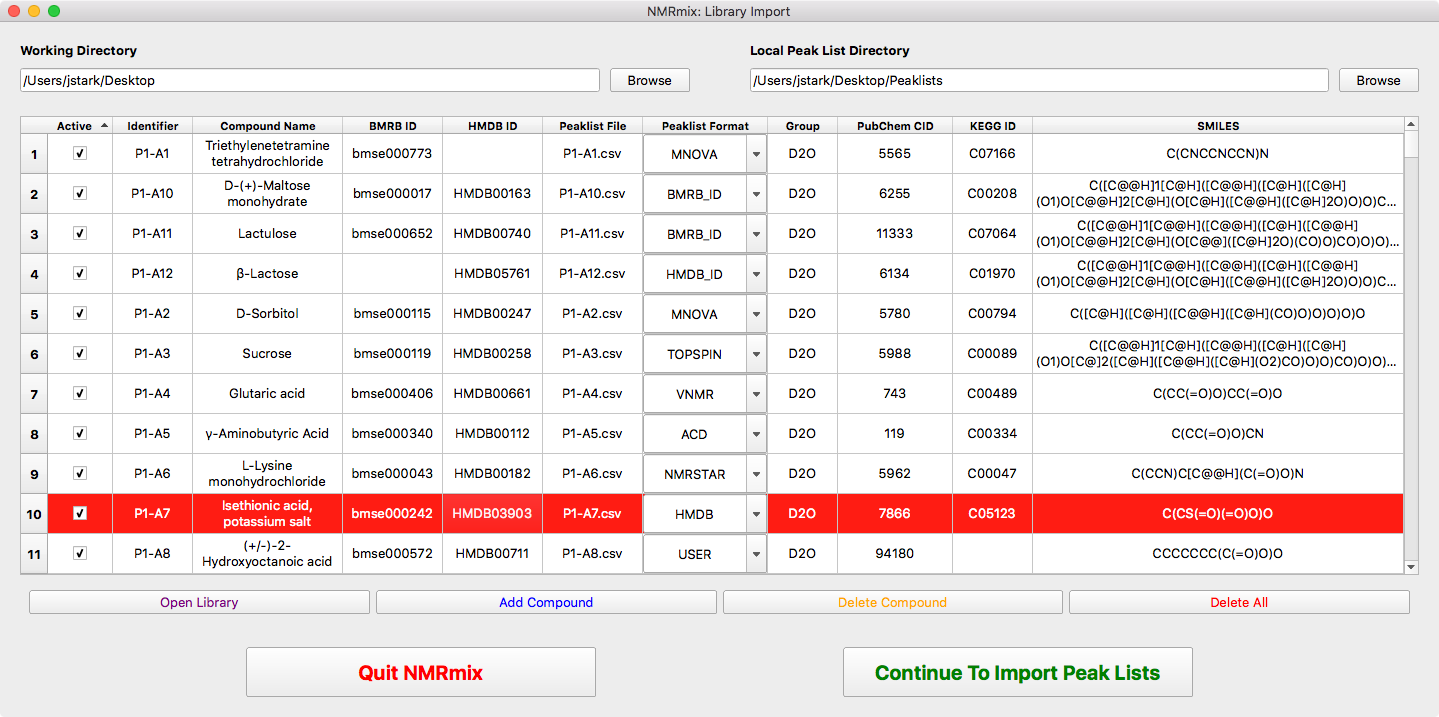
The compound library window is where the user will identify the compounds that will be used to make mixtures and associate those compounds to a peak list. Additional information regarding grouping and/or structure can also be added. While the adding of compounds can be done manually within NMRmix, it is often easier to generate a compound library file (see The Compound Table) externally using a spreadsheet program like Excel then import that library into NMRmix.
Setting Working and Peaklist Directories

- Working Directory
- Setting the Working Directory determines where NMRmix will save results and figures. Additionally, it also sets the initial directory that NMRmix search to open the compound library file.
- Local Peaklist Directory
- Setting the Local Peaklist Directory indicates where to find and save peak lists. Local peaklist files for each compound must be included in this folder. Even when using online sources for peaklists like BMRB and HMDB, the peaklists will be downloaded to the folder selected here.
The Compound Table

The compound table represents the information for each compound that will be used to create optimal mixtures. Each row of the compound table represents a single compound. Compounds can be added to the compound table one-by-one within NMRmix through the use of Add Compound and editing the individual fields. However, the easier way to add compounds is to create a library file and then import it into NMRmix. The library file is a CSV (Comma Delimited Values) file with a specific set of column headers that can be opened and edited within a spreadsheet editor like Excel. For a description of these columns, see Compound Library Fields.
Note
The values that exist within the compound table when peak lists are imported will be exported as a new library file when NMRmix outputs the optimization results (see The NMRmix Results). This will allow you to maintain the state of the library used for each use of NMRmix.
- Open Library
- Opens a file dialog window to select the library file to import. The file must be in the comma delimited format (CSV). Upon opening the library file, the contents of the compound table will be erased and replaced with the contents of the newly imported library file.
- Add Compound
- Add an empty row to the end of the compound table where details of a new compound can be added.
- Delete Compound
- Deletes the currently selected row. The currently selected row will be highlighted.
- Delete All
- Removes all compounds from the compound table.
Once all of the information for the compounds to be mixed has been added, pressing Continue to Import Peak Lists will open the window to Importing Peaklists. Any compound that has an empty identifier/compound name or has a duplicate identifier will pop up an error message. Compounds without any peak list information will fail during the peak list import.
Compound Library Fields
- Active
- Indicates whether the compound should be included for import and use in the mixtures. Active compounds will have peak lists imported and will be available in later components of NMRmix. Inactive compounds will not have their peak lists imported and will be ignored from the rest of the NMRmix process. Setting a compound to ignore allows for a compound to remain in the library, but be easily excluded from the compound currently being screened. This is useful in cases when there is no more stock solution of a compound or a screen only wants to screen particular types of compounds.
- Identifier
- The identifier is as unique string of characters that represents the compound. Ideally, the identifier should be kept to a low number of characters (< 10 characters) and should represent the compound beyond just one screen. Typical examples for a unique ID may be database identifiers, plate-well designations, inventory catalog numbers, etc. This is a required field.
- Compound Name
- The name of the compound being screened. The is a required field but does not need to be unique.
- BMRB ID
- The BMRB ID allows for compounds with 1H peak lists in the BMRB to be downloaded. The BMRB ID should follow the format of bmseXXXXXX, where the XXXXXX represents the six digit BMRB ID number. This field is optional if another peak list source exist.
- HMDB ID
- The HMDB ID allows for compounds with 1H peak lists in the HMDB to be downloaded. The HMDB ID should follow the format of hmdbXXXXX, where the XXXXX represents the five digit HMDB ID number. This field is optional if another peak list source is available.
- Peaklist File
- The filename, including extension, of the file containing the peak list data. These files should be located in the folder indicated for the Local Peaklist Directory (see Setting Working and Peaklist Directories). This field is optional if another peak list source is available through BMRB or HMDB.
- Peaklist Format
Indicates where to get the peak list data for the compound and what format the data is in.
- BMRB ID
- Must have BMRB ID field filled. It initially search for bmrbXXXXXX.str file in Local Peaklist Directory. If it exists, it will use that file, otherwise it will attempt to find the peak list associated with the BMRB ID online, and download the bmrbXXXXXX.str file to the Local Peaklist Directory. This option may require an internet connection.
- HMDB ID
- Must have HMDB ID field filled. It initially search for hmdbXXXXX.txt file in Local Peaklist Directory. If it exists, it will use that file, otherwise it will attempt to find the peak list associated with the HMDB ID online, and download the hmdbXXXXX.txt file to the Local Peaklist Directory. This option may require an internet connection.
- TOPSPIN
- The file indicated in the Peaklist File field is in the Bruker TopSpin (v3) format. If this option is chosen, the Peaklist File field must be filled with a valid file name.
- VNMR
- The file indicated in the Peaklist File field is in the Agilent VnmrJ format. If this option is chosen, the Peaklist File field must be filled with a valid file name.
- MNOVA
- The file indicated in the Peaklist File field is in the Mestrelab Mnova format. If this option is chosen, the Peaklist File field must be filled with a valid file name.
- ACD
- The file indicated in the Peaklist File field is in the ACD NMR Processor format. If this option is chosen, the Peaklist File field must be filled with a valid file name.
- NMRSTAR
- The file indicated in the Peaklist File field is in the NMRSTAR (v3) format. If this option is chosen, the Peaklist File field must be filled with a valid file name.
- HMDB
- The file indicated in the Peaklist File field is in the HMDB format. If this option is chosen, the Peaklist File field must be filled with a valid file name.
- USER
- The file indicated in the Peaklist File field is in the User-Defined format. If this option is chosen, the Peaklist File field must be filled with a valid file name.
- Group
Adding a group name to a compound indicates that the compound belongs to that group. This is useful in cases where some compounds of one group are not allowed to be considered in mixtures that contain a compound of another group. One common group classification is the solvent used to create the stock solution of the compound. It may be desirable to not mix compounds dissolved in D2O with compounds dissolved in DMSO.
Adding a group to a compound does not automatically keep different groups from mixing. The effects of grouping are not turned on until the option is selected when Setting Ignore Regions or restricting by group in Optimization Settings.
Note that any compound that does not have a group entered in this field when grouping is turned on is considered a member of the N/A group.
- PubChem CID
- This field allows a PubChem Compound ID (CID) to be associated with the compound. Currently, this value does not have any functionality in NMRmix, but may be used in future versions to populate information about the compound.
- KEGG ID
- This field allows a KEGG COMPOUND ID to be associated with the compound. Currently, this value does not have any functionality in NMRmix, but may be used in future versions to populate information about the compound, such as biochemical pathways.
- SMILES
- The simplified molecular-input line-entry system (SMILES) 1D representation of the compound. This used to provide 2D molecular structure representation in the NMRmix user interface.
- Notes
- Allows for general text notes to be stored for each compound. This field is not currently used in NMRmix.